Coupons
Coupons let you offer a discount — a flat amount or a percentage — on either application payments or course fees. Admins create and configure coupons in the Admin Console, then assign them to specific users or groups. Those users see the coupon in the CRM and apply it during a student's payment.
How to Create a Coupon
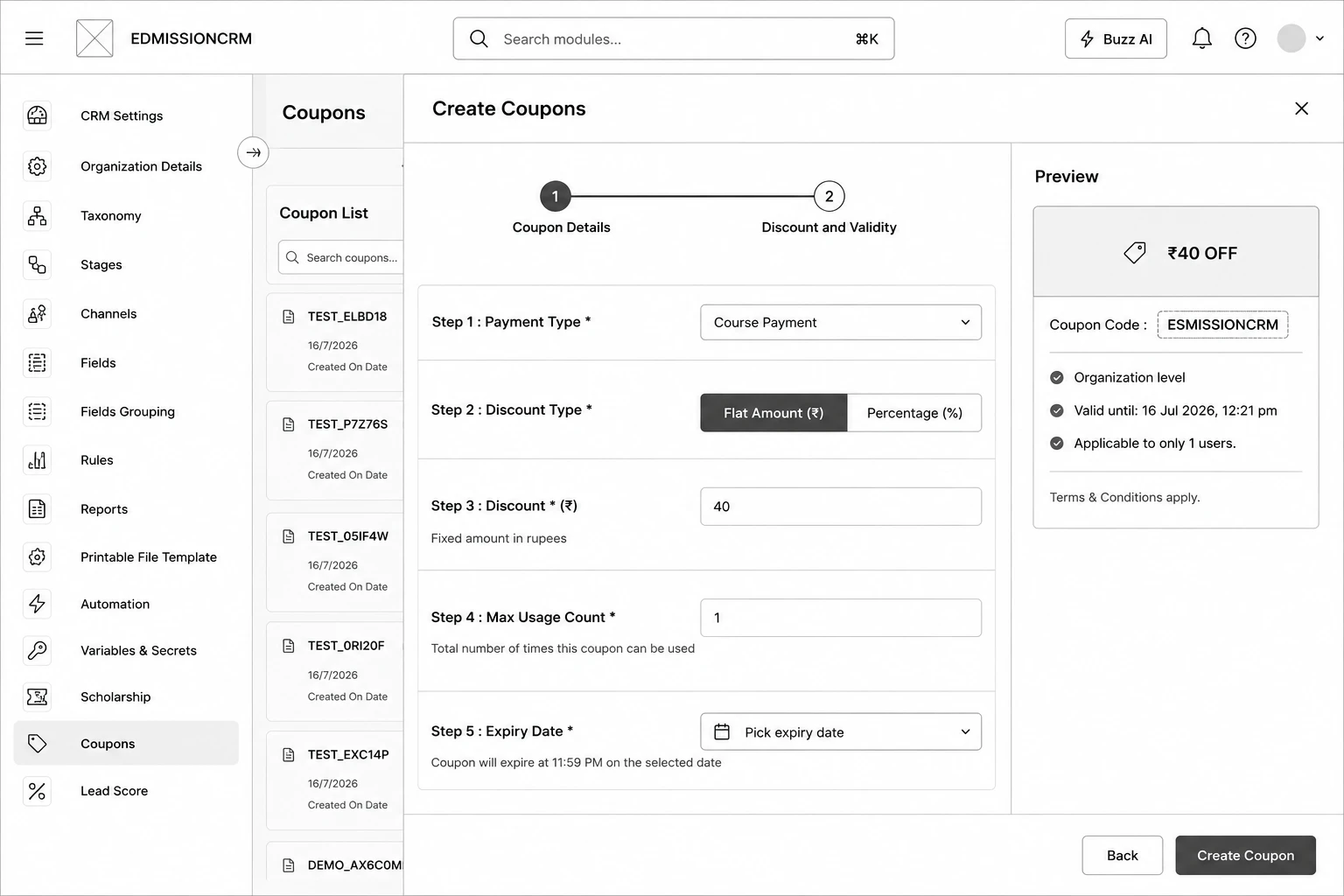
Step 1: Go to Coupons from the sidebar and click Create Coupon.
Step 2: Enter a Coupon Name.
Step 3: Choose the Coupon Mode — Single Coupon or Bulk Coupons .
Step 4: Enter a Coupon Code , or — for Bulk — enter the Number of Coupons to generate.
Step 5: Choose the Application Level — Organization or Taxonomy .
Step 6: (If Taxonomy) Select the specific Taxonomy it applies to.
Step 7: Assign to Users and/or Assign to Groups — only assigned users will see this coupon in the CRM.
Step 8: Click Next to move to Step 2 — Discount and Validity.
Step 9: Select the Payment Type — Application Payment or Course Payment.
Step 10: Choose the Discount Type — Flat Amount (₹) or Percentage (%) — and enter the Discount value.
Step 11: Set the Max Usage Count — how many times the coupon can be redeemed in total.
Step 12: Set the Expiry Date.
Step 13: Turn the Activate coupon switch to Active.
Step 14: Click Create Coupon.