Forms — Enquiry Form
An Enquiry Form is a short, single-page form used to capture new leads from your website or ad campaigns. Once published, it generates trackable, shareable URLs (with QR codes) tagged by campaign, channel, source, and medium.
What You Can See
The Enquiry Form List shows every form as a card with its Title, Created/Published date, Last Modified date, and a status badge — Latest Changes Are Live (published) or Draft.
How to Create an Enquiry Form
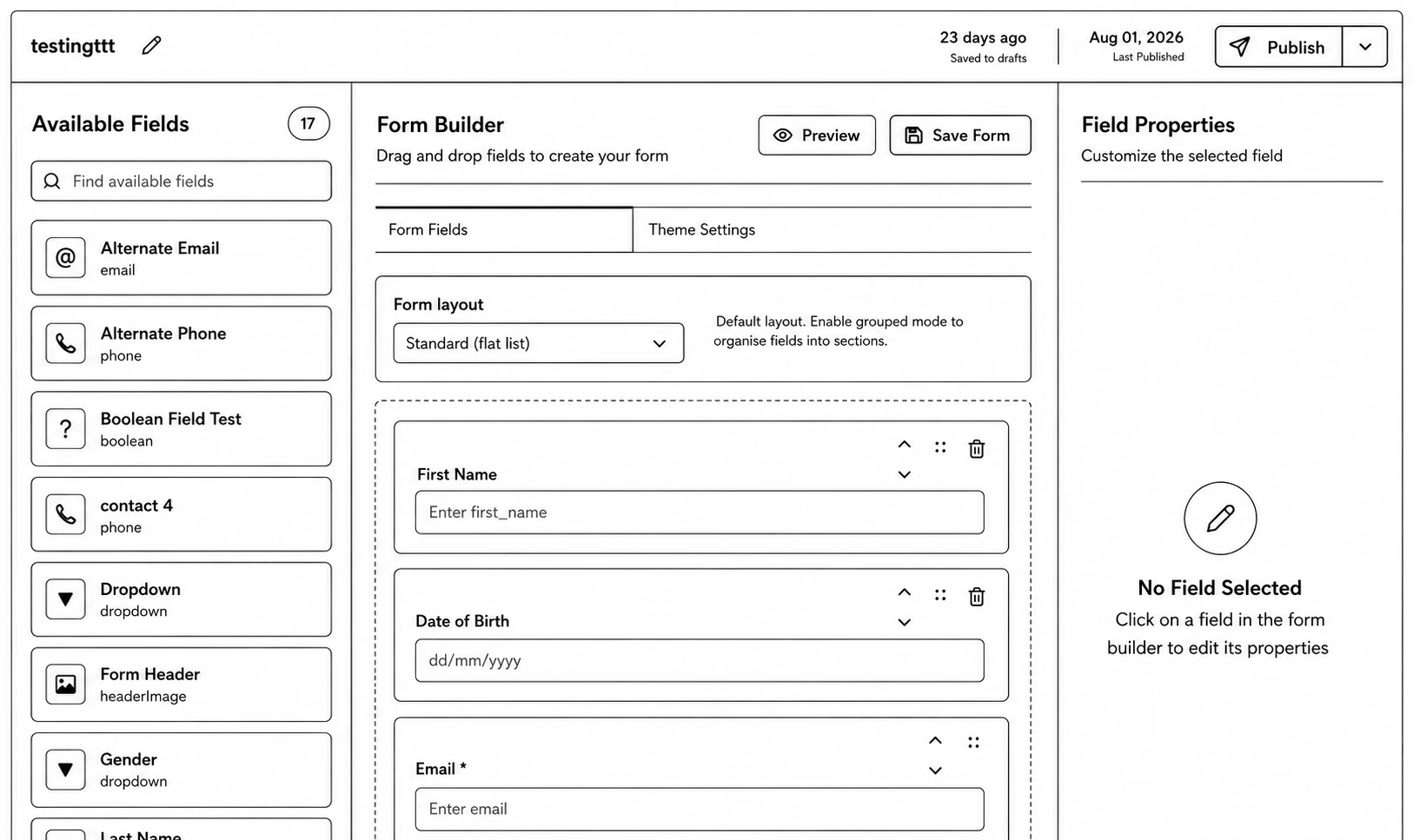
Step 1: Go to Forms → Enquiry Forms and click Create New Form.
Step 2: Enter the form's title and description in the dialog — this takes you straight into the builder.
Step 3: Drag fields from the sidebar onto the canvas. Available field types: Inputbox, Email, Phone, Select, Textarea, Checkbox, Radio group, Switch, Button, Number, Taxonomy, Location Selector, Header Image, OTP, Label.
Step 4: Customize the look using the Theme Editor, and click Preview to check it.
Step 5: Click Publish, or use the dropdown for Publish & Generate URL to publish and immediately create a trackable link.
Managing Enquiry Forms
- Duplicate, Edit (opens the builder), Publish.
- Once published: Generate URLs (create a new trackable link tagged by Campaign/Channel/Source/Medium), Export URLs to CSV, and per-URL actions Copy URL, View QR, and URL Settings (toggle public access on/off).